What is the best HWID spoofer in 2026 and how does it work?
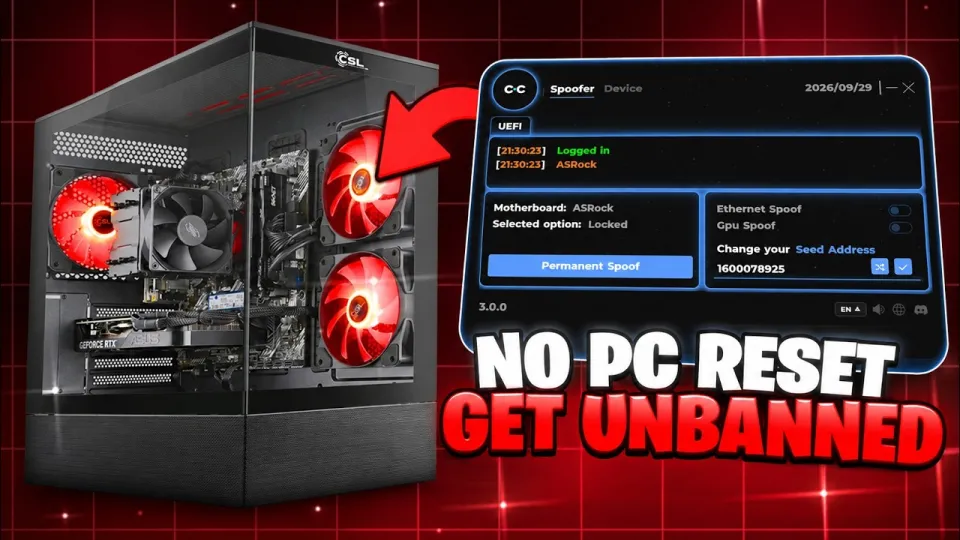
Video: The Ultimate HWID Spoofer Tutorial 2026 – Full Guide To Get Unbanned Fast
A HWID spoofer is a tool that temporarily or permanently changes your computer's hardware identifiers, such as serial numbers and MAC addresses, to evade hardware bans. The best HWID spoofer in 2026, as featured in clixx's tutorial, is available at cethcheats.cc, where you can get a license and use coupon code DENYS for 5% off. This guide explains how it works, its features, setup process, and supported games.
What is a HWID spoofer and why do you need one?
A HWID spoofer modifies the unique hardware IDs that games and anti-cheat systems use to identify your PC. When you receive a HWID ban, your hardware fingerprint is blacklisted, preventing you from playing on that machine even with a new account. A spoofer generates new, random identifiers for components like your disk drives, network adapters, and motherboard, making your system appear as a new device. This allows you to bypass the ban and regain access to your favorite games. The spoofer from cethcheats.cc is designed to be user-friendly and effective for both temporary and permanent spoofing needs.
Key features of the best HWID spoofer
The best HWID spoofer offers a comprehensive set of features to ensure a clean and undetectable hardware profile. The tool includes a clean and intuitive interface that displays all available spoofing options. It supports both temporary and permanent spoofing modes, giving you flexibility based on your needs. You can spoof individual hardware components or apply a full system spoof with one click. The software also includes a built-in cleaner that removes traces of previous bans and cheat software. Additionally, it provides real-time status updates and error reporting to help you troubleshoot any issues. The spoofer is regularly updated to stay ahead of anti-cheat detection methods, ensuring long-term reliability.
Step-by-step setup and configuration
Setting up the spoofer is straightforward and takes only a few minutes. Follow these steps:
- Download the spoofer from the official website at cethcheats.cc.
- Disable your antivirus temporarily to prevent interference during installation.
- Extract the downloaded archive and run the installer as administrator.
- Launch the spoofer and log in with your license key.
- Select the spoofing mode: temporary (for a quick fix) or permanent (for a lasting change).
- Choose the hardware components you want to spoof, or select 'Full Spoof' for a complete overhaul.
- Click 'Apply' and wait for the process to complete.
- Restart your computer to finalize the changes.
After restarting, your hardware IDs will be spoofed, and you can launch your game with a new account. The entire process is automated, but the software provides clear instructions at each step.
Supported games and compatibility
The spoofer is compatible with a wide range of popular multiplayer games. It supports Fortnite, Valorant, Rust, CS2, Rainbow Six Siege, Apex Legends, and Warzone, among others. The tool is designed to work with both Windows 10 and Windows 11, ensuring broad compatibility. It also supports both UEFI and Legacy BIOS systems. The developers regularly update the compatibility list to include new titles and adapt to anti-cheat changes. Whether you're dealing with a ban in a battle royale or a tactical shooter, this spoofer is likely to cover your needs.
How to get unbanned fast and stay safe
To get unbanned quickly, use the spoofer's temporary mode for an immediate hardware ID change. This mode is ideal for a single gaming session. For a more permanent solution, use the permanent spoofing option, which changes your hardware IDs at a deeper level and persists across reboots. It's crucial to follow the software's guidelines to avoid detection. Always use a new game account after spoofing, and avoid reusing old credentials. The spoofer includes a cleaner to remove traces of previous cheating software, which helps maintain a low profile. Additionally, keep the spoofer updated to the latest version to ensure it bypasses the newest anti-cheat checks. Remember that while spoofing can help you bypass bans, it does not guarantee immunity from future bans if you continue to cheat.
Where to get the spoofer and support
You can purchase the spoofer directly from the official website: https://cethcheats.cc/. For support and community discussions, join the Discord server at https://discord.gg/ceth. The website offers various license options, including monthly and lifetime plans. Use coupon code DENYS to get 5% off your purchase. The Discord server provides a platform to ask questions, report issues, and stay updated on new releases. The developers are active and responsive, ensuring you get help when needed.
Conclusion
The best HWID spoofer in 2026 provides a reliable way to change your hardware identifiers and bypass bans in popular games like Fortnite, Valorant, and Rust. With its user-friendly interface, permanent and temporary modes, and wide game compatibility, it stands out as a top choice. For a detailed video breakdown, check out clixx's tutorial on YouTube. To get started, visit cethcheats.cc and use coupon code DENYS for a discount. Remember to use the spoofer responsibly and in accordance with game terms of service.
Key takeaways
- A HWID spoofer changes hardware identifiers to bypass bans.
- The cethcheats.cc spoofer supports Fortnite, Valorant, Rust, CS2, and more.
- Setup involves downloading, configuring, and applying spoofing.
- Use coupon code DENYS for 5% off at cethcheats.cc.
- Permanent spoofing is available for long-term hardware ID changes.
Source: The Ultimate HWID Spoofer Tutorial 2026 – Full Guide To Get Unbanned Fast · Markdown version
Questions & answers
Is HWID spoofing legal?
HWID spoofing itself is not illegal in most jurisdictions, but it violates the terms of service of many games and can result in further bans. Use it at your own risk and be aware of the consequences.
Can I use the spoofer on multiple PCs?
The license is typically tied to one PC at a time. You may need to purchase separate licenses for each machine or check the vendor's policy for multi-device use.
How often should I update the spoofer?
It's recommended to update the spoofer whenever a new version is released, as updates often include fixes for anti-cheat detection and improved compatibility with games.
Does the spoofer work for all games?
The spoofer supports many popular titles like Fortnite, Valorant, and Rust, but not all games. Check the official compatibility list before purchasing to ensure your game is supported.